How to Use Celebrity Look Alike: The Complete Tutorial (2026)
The Complete Founder-Led Tutorial to Finding Your Celebrity Twin on Celebrity Look Alike in 2026
Welcome, friend! I'm Hamza, the founder of Celebrity Look Alike, and today I'm walking you through exactly how to use the tool I built, step by step, with a screenshot for every single step.
Follow this tutorial and you'll go from a selfie on your phone to a ranked list of your celebrity matches in under 2 minutes. There's no catch, no tricks, and no up-sells here. Just the exact process, in the right order, with nothing left out.
Now without further delay, let's dive in.
- Step 1.Hit "Find My Celebrity Match" (where the tool lives)
- Step 2.Choose your target gender (filter your match pool)
- Step 3.Upload your portrait photo (the right way to do it)
- Step 4.Pick your celebrity origin (Hollywood, Bollywood, 90s, or all)
- Step 5.Let the AI map your face (what happens in those few seconds)
- Step 6.Meet your top matches (reading the results grid)
- Step 7.Read your zone scores (what the percentages actually mean)
- Step 8.Download or share your result card (your shareable twin reveal)
- Step 9.The Bollywood stress test (one photo, one famous family)
- Step 10.SRK at #1, Aryan Khan at #3 (the moment that sold me)
- Step 11.Your Bollywood result card (proof you can share)
Do I need to sign up or pay anything?
No, and I'll explain why below. The tool is completely free, with no account, no login, and no app to download. It runs right in your browser.
Is my photo stored anywhere?
No. Your photo is processed in temporary memory and discarded the instant your matches are generated. It is never written to disk, never shared with third parties, and never used to train AI models. There is literally nothing stored to delete.
How long does the whole thing take?
Under 2 minutes from upload to results. The analysis itself takes a few seconds.
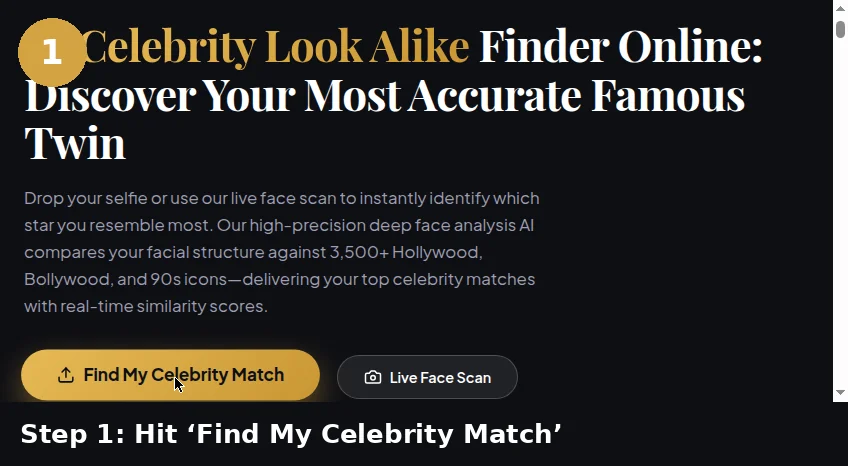
Step 1. Hit “Find My Celebrity Match”
Open celebritylookalike.net and you'll land on the tool's home screen. Right in the hero section sits the big gold button: “Find My Celebrity Match”. That button is the front door to everything in this tutorial.
Next to it you'll also see “Live Face Scan”, which opens camera mode if you'd rather snap a fresh photo than upload one. For this tutorial, we're uploading.
One click on that gold button and the 3-step wizard opens. That's where the fun starts.
Step 2. Choose your target gender
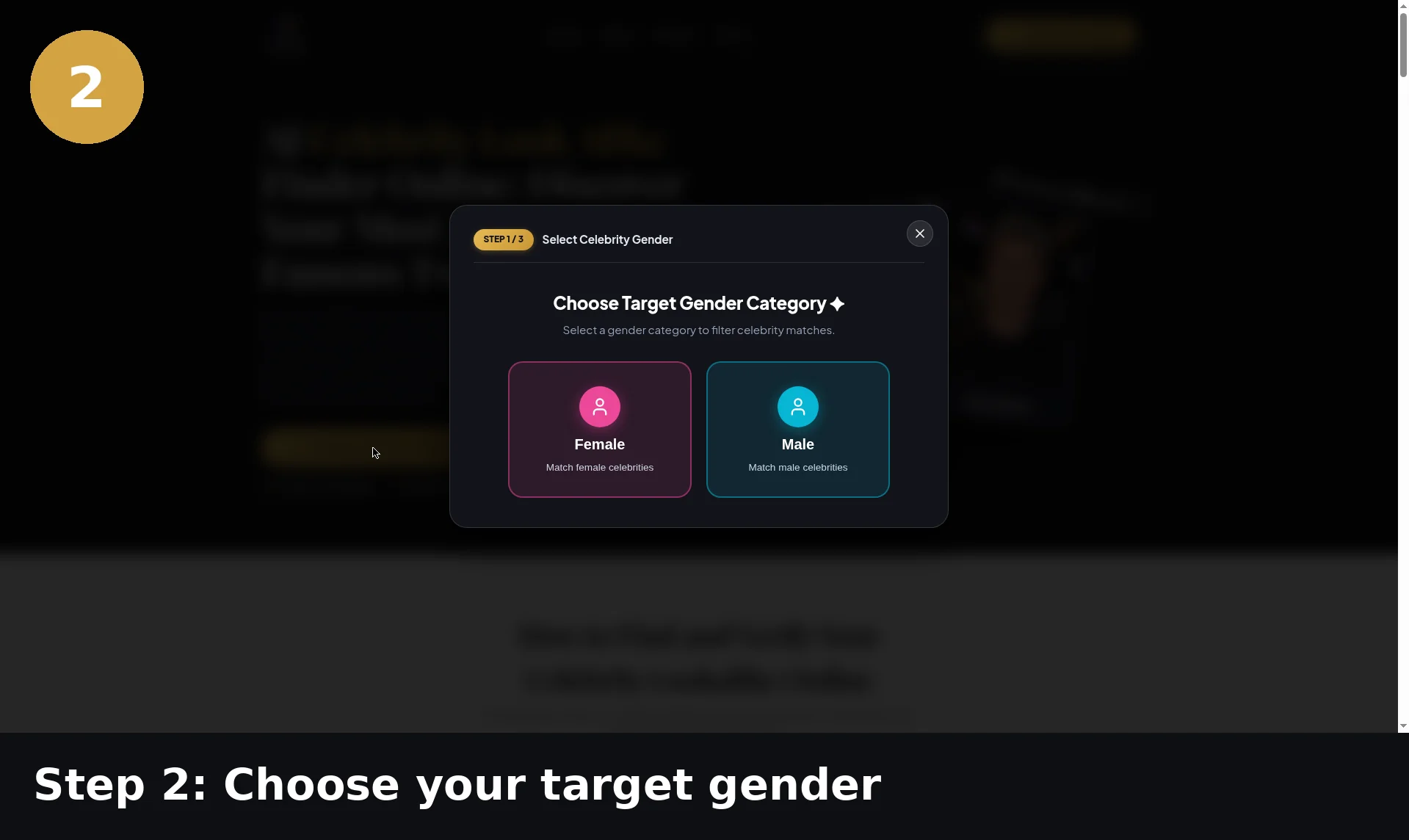
The wizard's first screen is STEP 1/3: “Select Celebrity Gender”. The heading reads “Choose Target Gender Category”, and you get two big tiles: Female (“Match female celebrities”) in pink, and Male (“Match male celebrities”) in teal.
This filter narrows the 3,500+ celebrity database down to the pool you want to be compared against. Pick the one that fits the photo you're about to upload. For our test run, I picked Male.
Don't get stuck here. This isn't a commitment, and you can change it later from the upload screen without starting over.
Step 3. Upload your portrait photo
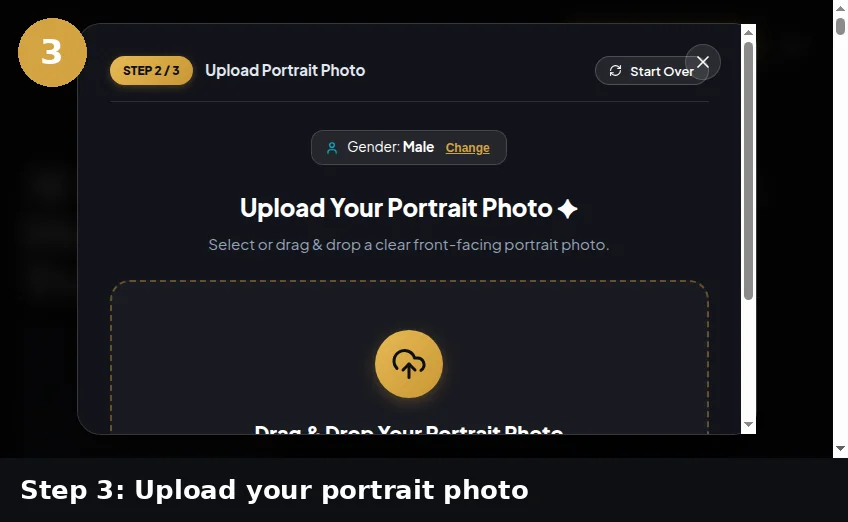
STEP 2/3: “Upload Portrait Photo”. The screen says “Upload Your Portrait Photo” with one clear instruction: “Select or drag & drop a clear front-facing portrait photo.”
Click anywhere in the dashed drop zone, or drag a photo straight from your files. The tool accepts JPEG, PNG, and WebP files under 10MB. Notice the little “Gender: Male” chip with a Change link at the top, in case you want to switch pools without starting over.
What photo works best? A clear, front-facing selfie in natural daylight, no sunglasses, no heavy filters, and a neutral expression. The AI reads bone structure, not hairstyles, so give it a clean look at your face and it will handle the rest.
For Test 1, I uploaded a stock portrait of a smiling man. Nothing fancy. Let's see what the AI makes of him.
Step 4. Pick your celebrity origin
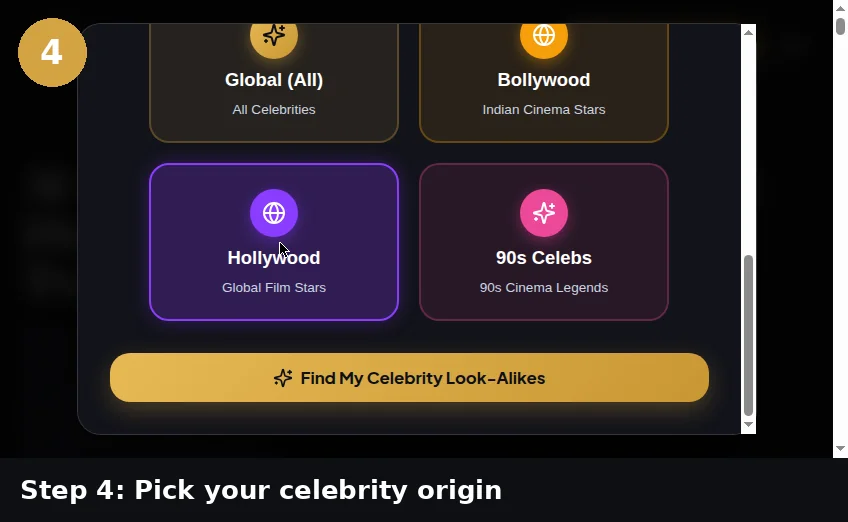
STEP 3/3 is where it gets interesting. The screen reads “Choose Celebrity Origin”: “Select which dataset to match your facial features against.”
You get four tiles: Global (All) (“All Celebrities”), Bollywood (“Indian Cinema Stars”), Hollywood (“Global Film Stars”), and 90s Celebs (“90s Cinema Legends”). This is the part most people skip past too fast, so slow down here. The origin you pick decides the entire universe your face gets compared against.
For Test 1, I tapped Hollywood (it highlights in purple to confirm your pick), then hit the big gold “Find My Celebrity Look-Alikes” button at the bottom.
It's time to move into the next stage, where the AI does its thing.
Step 5. Let the AI map your face
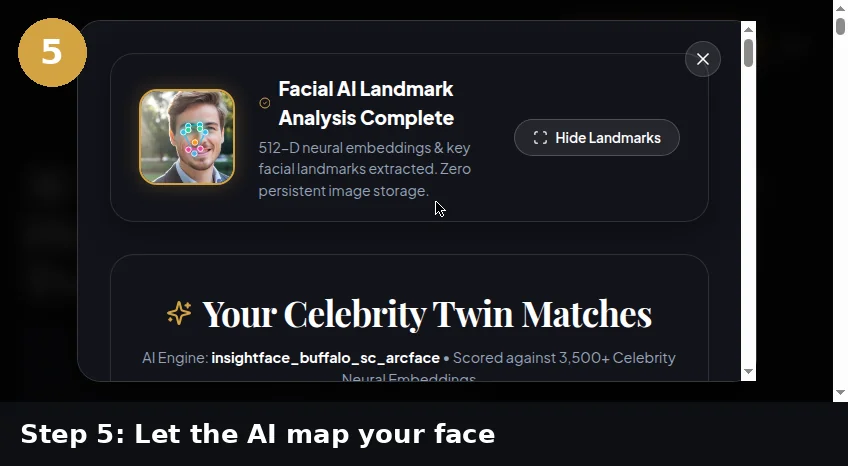
The moment you hit that button, the analysis takes over. The status line reads “AI Engine: Processing facial landmark vectors” while the system maps your face.
What it's actually doing in those few seconds: extracting 512-D neural embeddings and mapping 478 facial landmarks across your eyes, nose, jawline, and cheekbones, then scoring them against 3,500+ celebrity neural embeddings. The engine is insightface_buffalo_sc_arcface, and it compares pure facial geometry. Hairstyles, glasses, and lighting get ignored.
When it's done, you'll see “Facial AI Landmark Analysis Complete” with a landmark overlay on your photo (hit “Hide Landmarks” for the clean view) and the line that matters most to me as the founder: “Zero persistent image storage.”
Step 6. Meet your top matches
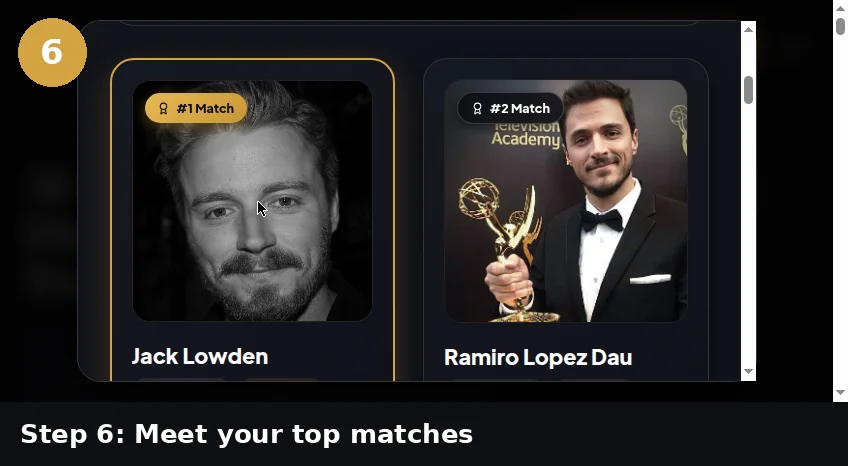
And here they are. The results screen opens with “Your Celebrity Twin Matches” and the engine line underneath: “AI Engine: insightface_buffalo_sc_arcface • Scored against 3,500+ Celebrity Neural Embeddings.”
Our test photo's Hollywood run came back like this:
A quick note on the numbers, because I get asked about this constantly. For real selfies, a 40%–65% score is a strong structural match. The demo samples on the homepage show 90%+ because those are near-identical lookalikes. Your results are ranked by mathematical similarity, not by how famous the match is.
Above the grid you'll also see the tabs: Best Pair, Overall (10), Male (10), Female (0). Best Pair combines your top male and female matches into one comparison.
Step 7. Read your zone scores
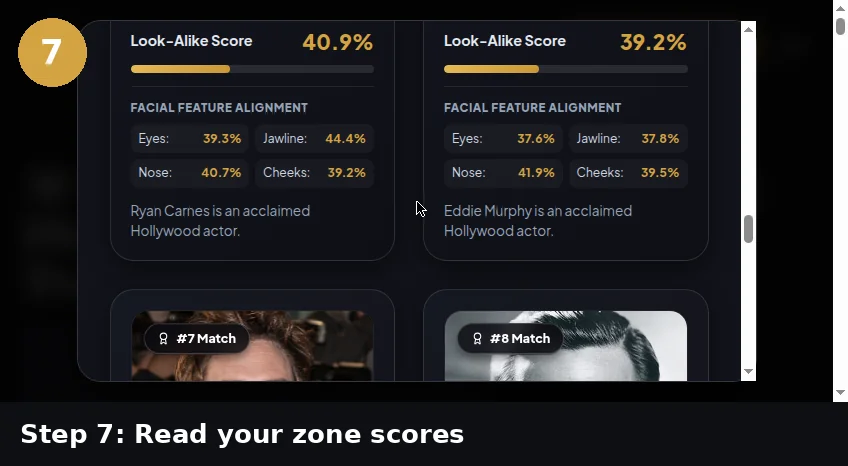
Tap any match card and it expands into the detail view. This is my favorite part of the results, because it shows you why the AI picked this person.
Each card carries a Look-Alike Score with a progress bar, then a FACIAL FEATURE ALIGNMENT section with four zone scores: Eyes, Jawline, Nose, and Cheeks. Our #1 match, Jack Lowden, broke down as Eyes 43%, Jawline 47.4%, Nose 48.7%, Cheeks 49.8%.
These aren't decorative. Every match gets its own computed zone scores, so you can see exactly which parts of your face drove the ranking. If your jawline score runs high and your eyes score runs low, that's the AI telling you the resemblance lives in your lower face.
Step 8. Download or share your result card
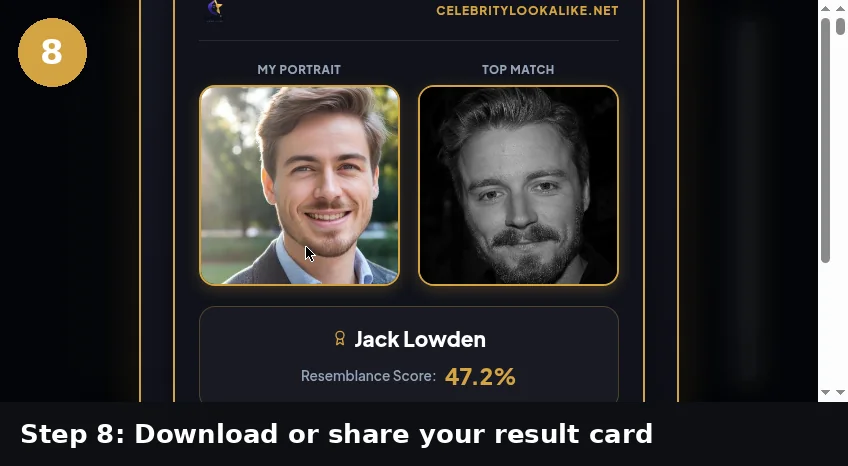
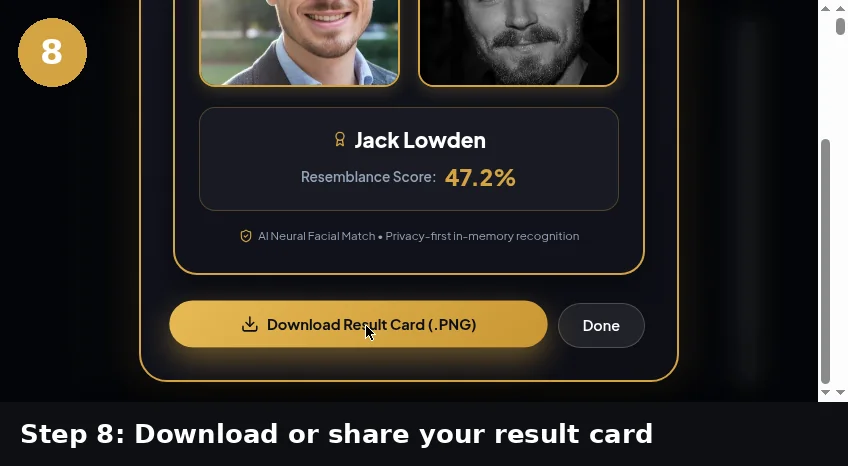
The last step of the flow is the payoff. From your top match you'll get the “My Celebrity Twin Result” dialog: “CELEBRITYLOOKALIKE.NET” across the top, your MY PORTRAIT next to the TOP MATCH, the name in gold, and the big “Resemblance Score: 47.2%” line, with the trust line underneath: “AI Neural Facial Match • Privacy-first in-memory recognition.”
Two buttons close it out: “Download Result Card (.PNG)” and “Done.” The card is a polished, watermark-verified image built for sharing. One tap and it's ready for Instagram, TikTok, X, or WhatsApp.
This is the moment the whole tutorial builds toward. You came with a selfie, and you leave with a shareable twin reveal.
Step 9. The Bollywood stress test: one photo, one famous family
Now for the part I really wanted to show you. A good tool handles easy cases. A great tool survives a stress test.
I took a photo of a young man who looks strikingly like a young Shah Rukh Khan and ran it against the Bollywood dataset. My prediction before running it: Shah Rukh Khan himself at #1, and somewhere in the top results, his son.
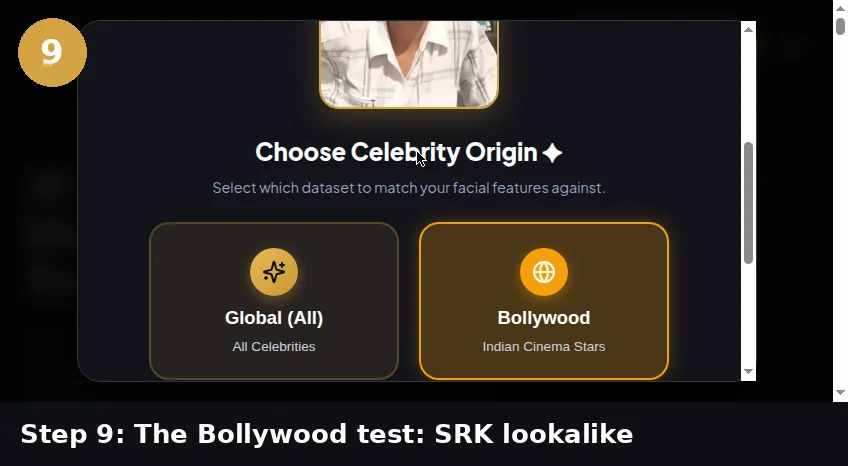
Same wizard, new photo. Back at the origin screen, I uploaded the lookalike photo and tapped Bollywood (“Indian Cinema Stars”). The tile highlights in gold to confirm your pick.
Step 10. SRK at #1, Aryan Khan at #3
I know what you're thinking. Did it actually work?
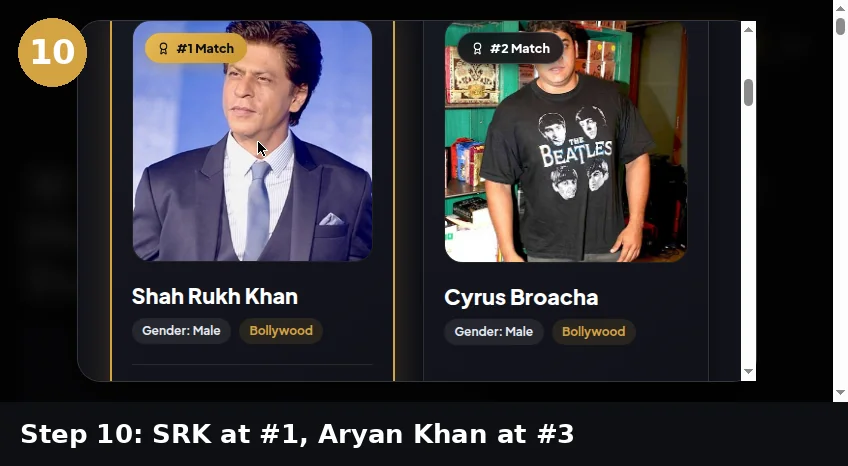
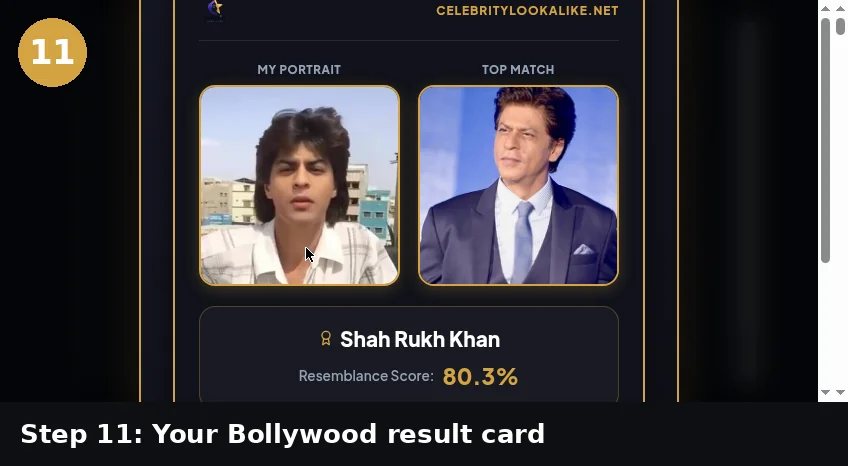
The results came back: #1 Shah Rukh Khan at 80.3%, with zone scores of Eyes 79.5%, Jawline 79.5%, Nose 81.1%, Cheeks 81.1%. And sitting at #3: Aryan Khan at 53.6%.
Read that again. The AI found the man's son purely from facial geometry. Nobody told the model these two people are related. It simply measured bone structure and concluded that the same family of features appears in both faces. That is the entire point of this tool, and no homepage demo makes the case better than this one result.
The full top 10:
Step 11. Your Bollywood result card
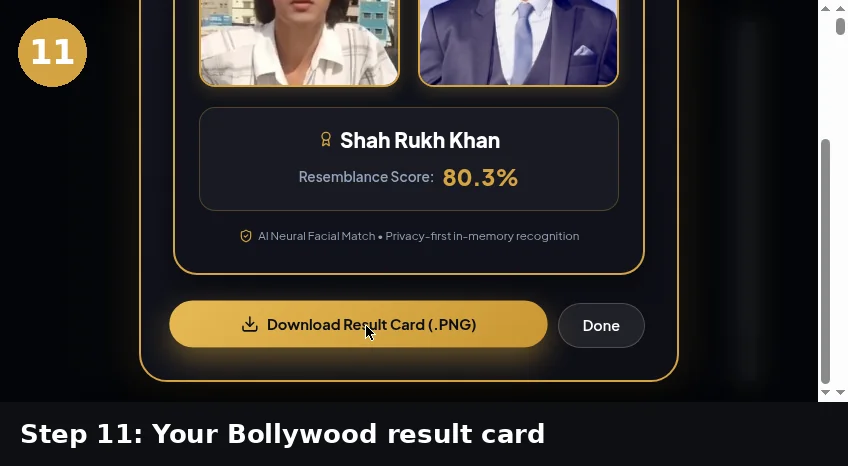
Same finish as before, new twin. The “My Celebrity Twin Result” card for this run shows the lookalike's portrait next to Shah Rukh Khan with “Resemblance Score: 80.3%” in gold. “Download Result Card (.PNG)” saves it, “Done” closes the dialog.
If you ever wanted proof to send the group chat, this is it.
Feeling a little camera-shy about your photo?
I get it. Uploading your face to a website feels like a big deal, even when the tool is free and takes 2 minutes.
Here's what I'd tell you as the person who built it: photo quality is the single biggest factor in your results.
- 1. Daylight selfie: Soft natural light gives the sharpest edge definition.
- 2. Face the camera straight on: Avoid angled profile or tilted head poses.
- 3. Camera at eye level: Avoid extreme high or low angles that distort jawlines.
- 4. Neutral expression: Gentle smiles work, but avoid dramatic grimaces.
- 5. No sunglasses or heavy filters: Keep eye sockets and cheek contours visible.
- 6. One person in the frame: Never submit crowded group photos.
- 7. Crop it tight: Keep head and shoulders filling at least 60% of the frame.
Do those seven things and you're giving the AI the cleanest possible read of your bone structure. And if a result ever feels off, don't argue with the score. Change the lighting or the angle and run it again. Consistent matches across 2–3 photos are worth more than any single result.
Final Thoughts on Finding Your Celebrity Look Alike
That's the complete tutorial: 11 steps, 2 tests, and 2 shareable result cards, all in a few minutes and all completely free.
The Hollywood test showed you the full flow. The Bollywood stress test showed you why I trust the models. Somewhere in that 3,500+ face database, your twin is waiting too.
Did I miss any of your questions about using the tool?
Whether you encountered an unexpected match, want a celebrity added to the database, or have feedback on the facial mapping engine, I read every message personally.